Integrations
Works with the tools you already run
Git hosts, identity providers, chat and AI assistants connect through standard protocols, and everything the interface does is in the REST API.
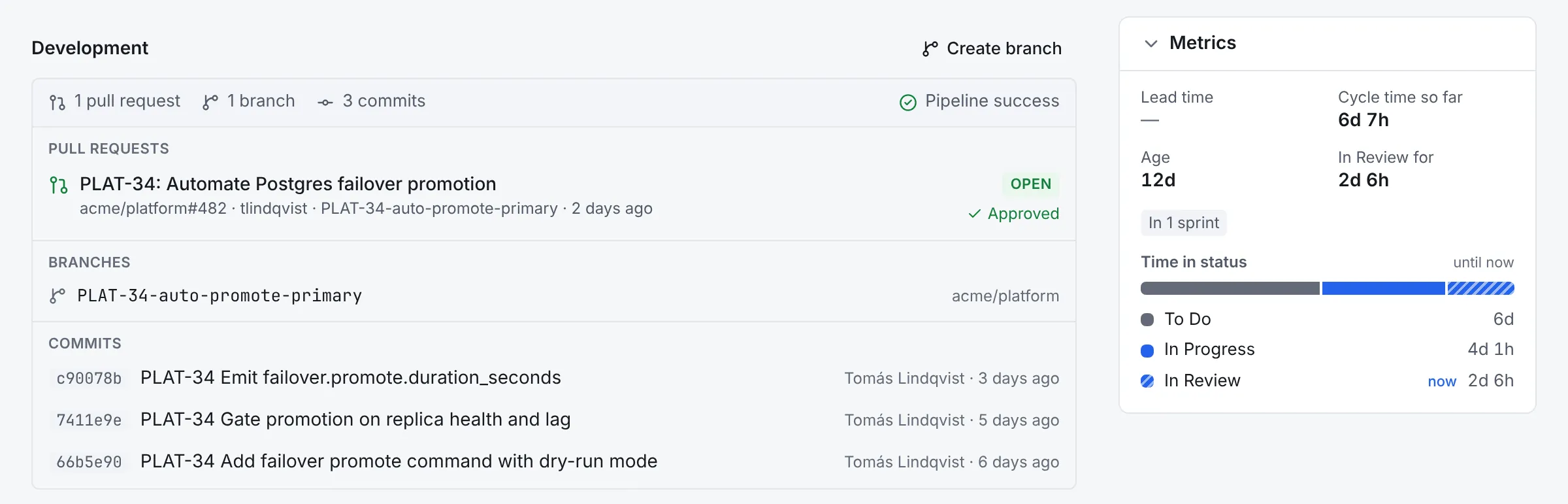
Pull requests, branches, commits and pipelines on the issue they belong to.
GitHub and GitLab
Linked by issue key
Connect a GitHub App or a GitLab token, on the cloud or self-managed. Put an issue key in a branch name, a commit message or a pull request title, and the issue shows the branch, commits, pull or merge requests and pipeline status.
- Smart commits run real workflow transitions, as the person who committed
- A comment on each new pull or merge request links back to the issue
- Create a branch from an issue
- Webhooks are verified, de-duplicated and stored before they're processed, and a periodic check catches anything missed
$ git commit -m "PLAT-142 #in-review #comment Ready for eyes"
$ git push origin plat-142-retry-webhooks

# PLAT-142 moves to In Review as the committer, with the comment,
# and shows the branch, the commit, the pull request and its pipeline.
Sign-in and provisioning
Joiners and leavers, without a ticket
Sign in with any OpenID Connect provider: Keycloak, Entra ID, Okta, Google and others, limited to your domains. Accounts follow your directory, and groups map to roles.
- Directory sync from Google Workspace or Keycloak, and a SCIM 2.0 server for Okta, Entra ID and others
- Groups from the sign-in token, single logout and back-channel logout
- Local accounts for people outside your provider, with two-factor authentication and recovery codes
- Personal access tokens, service accounts and your provider's own access tokens for the API, with scopes
# Sign in through Keycloak (or any OpenID Connect provider)
WFM_OIDC_PROVIDERS=keycloak
WFM_OIDC_KEYCLOAK_ISSUER=https://sso.example.net/realms/acme
WFM_OIDC_KEYCLOAK_CLIENT_ID=workflow
WFM_OIDC_KEYCLOAK_GROUPS_CLAIM=groups
WFM_ALLOWED_DOMAINS=example.net

# Sync the realm's people and groups on a schedule
WFM_KEYCLOAK_ENABLED=true
WFM_KEYCLOAK_URL=https://sso.example.net
WFM_KEYCLOAK_REALM=acme
WFM_KEYCLOAK_CLIENT_ID=workflow-sync
WFM_KEYCLOAK_SYNC_GROUP=/workflow-users
Slack and Mattermost
Updates where the team talks
Each project posts what happens (new issues, status changes, comments, sprints, releases, pull requests and failed pipelines) to the channels it chooses, filtered by event and by query. Automation rules can post too.
The /wfm command looks up an issue or runs a search without leaving the conversation, and works with Mattermost on a private network.
/wfm PLAT-142
/wfm search assignee = currentUser() AND sprint in openSprints()
AI assistants
AI assistants that act as you
Workflow has an MCP server, so Claude and other assistants can find work, read issues, boards and sprint reports, and file, update, move, link and comment on issues or log work.
Connect an assistant by its URL and approve it in the browser. It sees only what you can see, workflow rules still apply, and everything it changes is marked as made through it. Give it read-only access if that's all it needs.
search_issues       find work with a query
get_issue           an issue with its comments and links
get_sprint_report   scope, progress and burndown
get_metrics         cycle time, flow and velocity
get_project  get_board  list_projects  find_users  whoami
create_issue  update_issue  transition_issue
add_comment  link_issues  log_work
API
A REST API for everything
The API behind every screen, described with OpenAPI 3.1. Use personal access tokens, service accounts or your identity provider's tokens, follow changes with live events, and send events elsewhere with signed webhooks.
curl -H "Authorization: Bearer $WFM_TOKEN" \
  "https://workflow.example.net/api/v1/search?jql=project%3DPLAT"

# The OpenAPI 3.1 description is served by every instance.
Import
Moving from Jira
Bring projects across from Jira Cloud or Data Center with their history: issues keep their keys, and sprint reports, cycle time and flow charts cover the past. Re-run the import while teams move, and people claim their placeholder accounts when they first sign in.
Read the import guide →Issues, keys and types Sprints and rank order
Statuses and resolutions Comments and attachments
Links and sub-tasks Story points and historyKeep exploring
More of what Workflow does
Planning and tracking
Boards, backlog, sprints, the timeline, search and reports.
Workflows and automation
Versioned YAML workflows, CEL rules, a visual editor and automation.
Service desk
A help centre, request forms, queues, SLAs and approvals.
Self-hosting
One image, PostgreSQL and a Helm chart, air-gapped if needed.