Workflows and automation
Your process, versioned like code
Workflows are YAML documents: statuses, transitions, and rules written in CEL. Edit them in the visual editor or apply them from CI, and let automation rules keep related work in step.
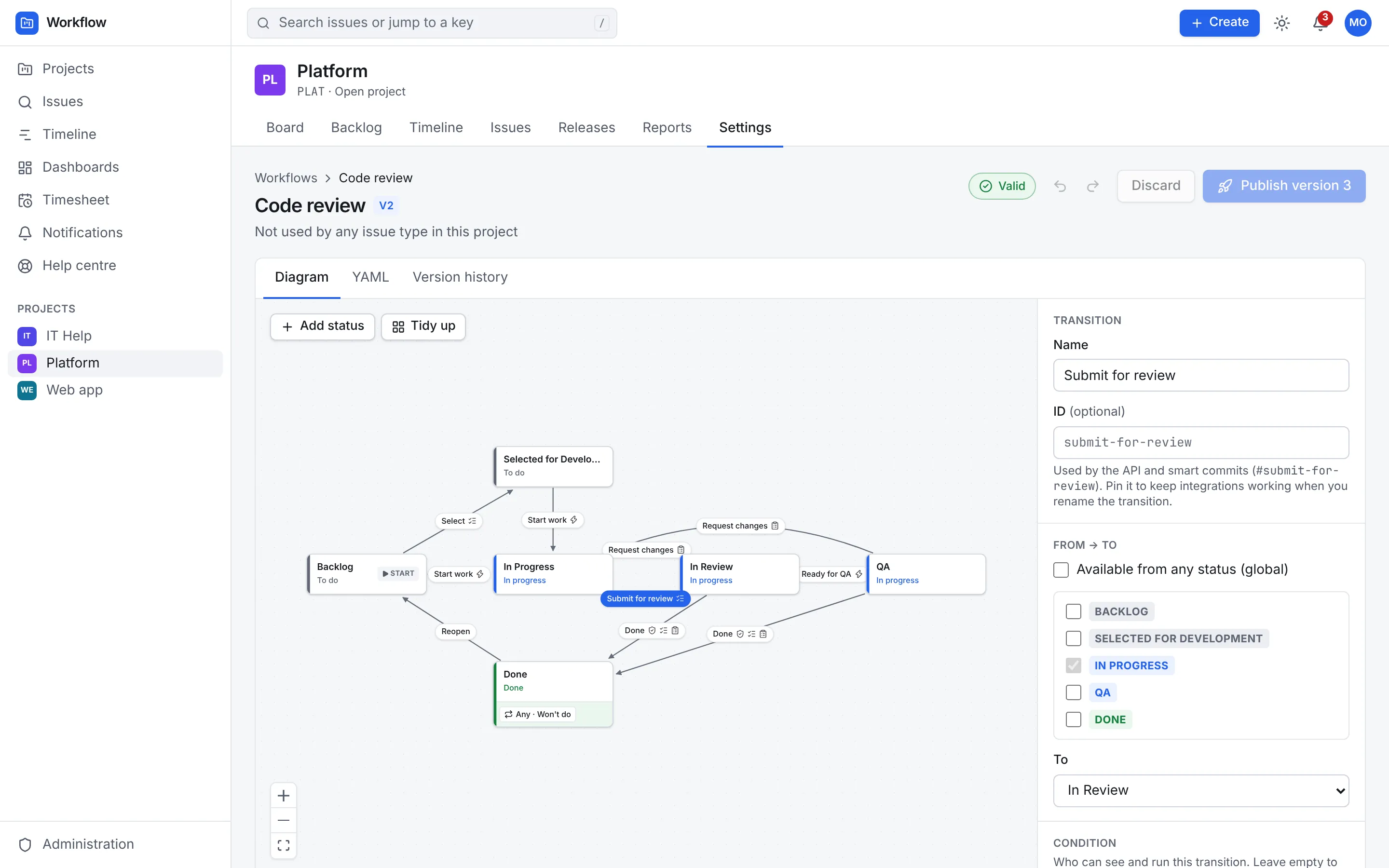
The visual editor and the YAML are two views of the same workflow.
Workflows as code
Write your process down once
A workflow lists its statuses, each in a To do, In progress or Done category so reports work across every project, and the transitions between them. Each transition can carry rules:
- Conditions: who may run it, such as
actor.hasRole("member") - Validators: what must be true first, with the message people see
- Screens: the fields to ask for, like a resolution or a comment
- Post-functions: assign the issue, set or clear a field, notify people or call a webhook
kind: Workflow
name: Code review
statuses:
  - { name: Backlog, category: todo }
  - { name: In Progress, category: in_progress }
  - { name: In Review, category: in_progress }
  - { name: Done, category: done }
transitions:
  - name: Start work
    from: Backlog
    to: In Progress
    postFunctions: [{ assignTo: actor }]
  - name: Submit for review
    from: In Progress
    to: In Review
    validators:
      - expr: issue.devLinks.exists(d, d.kind == "pr")
        message: Link a pull request first.
  - name: Done
    from: In Review
    to: Done
    condition: actor.hasRole("admin") || actor.hasRole("member")
    validators:
      - expr: issue.subtasks.all(s, s.category == "done")
        message: Finish every sub-task first.
    screen: [resolution]
Versions
Change it without breaking anything
Publishing a workflow creates a new version. Issues stay on the version they started on until a background migration moves them, using the status mapping you give for anything you removed.
wfm workflow apply publishes from CI and does nothing when the document hasn't changed, so workflows can live in Git next to the rest of your configuration and go through the same reviews.
- Conditions and validators are CEL expressions, testable like any other code
- Examples to start from: a code-review flow and an incident flow
# In CI: check the document, preview, then publish
wfm workflow validate -f workflows/code-review.yaml
wfm workflow apply -f workflows/code-review.yaml --project PLAT --dry-run
wfm workflow apply -f workflows/code-review.yaml --project PLAT \
    --map "Ready for QA=In Review"

# Nothing changed? apply reports "unchanged" and does nothing.
Automation
Automation for the busywork
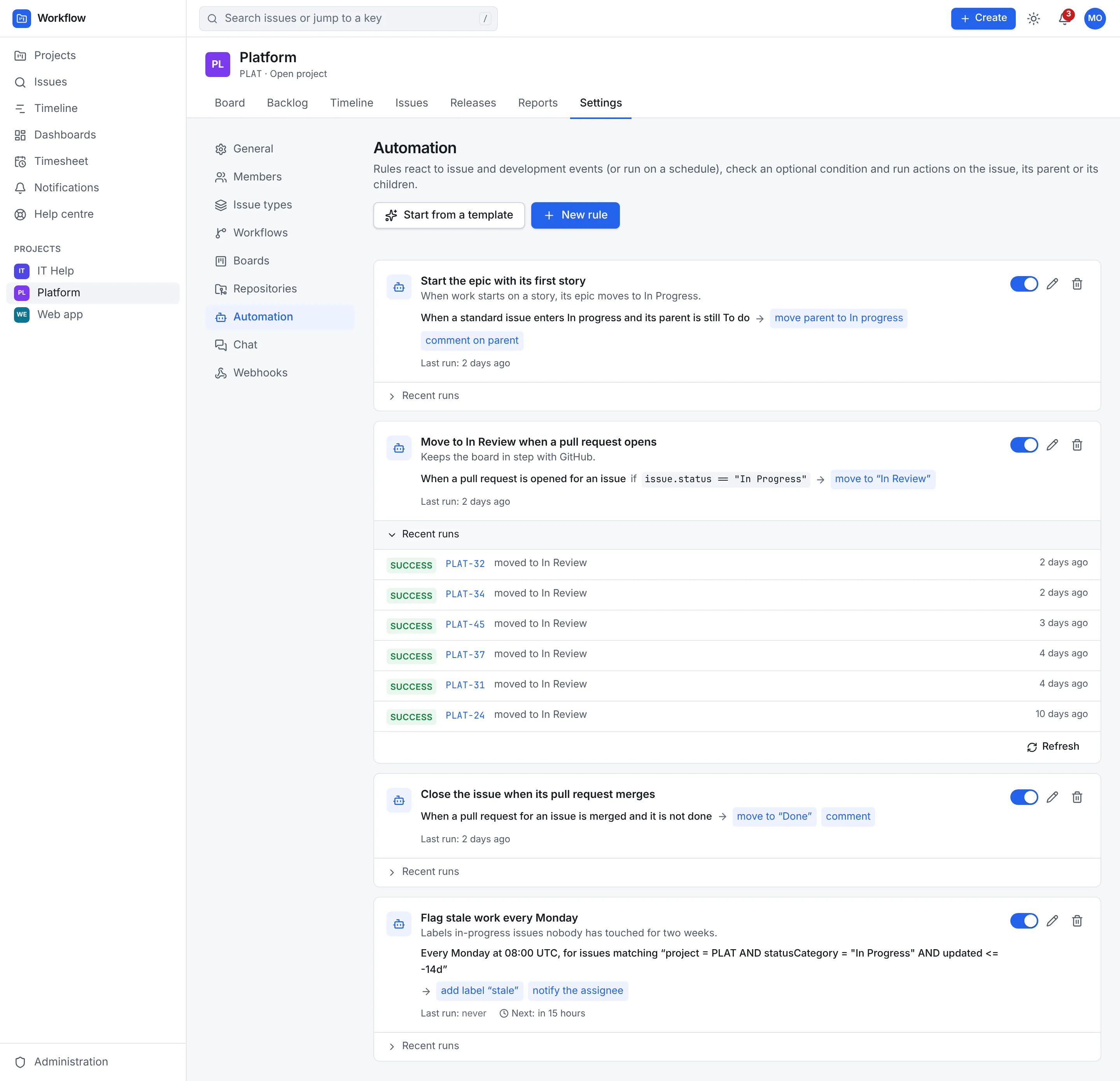
Rules run when something happens, check a CEL condition, and act on the issue, its parent or its children. That's how a story finishes when its last sub-task does, or an epic starts with its first story.
- Triggers: issue created, moved or edited; pull request opened or merged; commit or branch pushed; pipeline finished; SLA breached; or a schedule
- Actions: move, assign, set a field, comment, label, notify, post to chat, call a webhook or roll up dates
- Ready-made templates to start from
- A rule never triggers itself, and chains of rules stop after five levels
Webhooks
Signed webhooks for everything else
Send issue, comment, sprint, release and SLA events to other systems, per project or for the whole organisation. Every delivery carries an HMAC-SHA256 signature of its body and a unique id, so the receiver can check it came from you and handle each one once.
Read about automation and webhooks →POST /your/endpoint
X-WFM-Event: issue.transitioned
X-WFM-Delivery: 0b9c1d2e-…
X-WFM-Signature-256: sha256=5f1c…
{
"event": "issue.transitioned",
"timestamp": "2026-11-02T10:15:00Z",
"project": { "key": "PLAT", "name": "Platform", … },
"actor": { "displayName": "Priya Shah", … },
"issue": { "key": "PLAT-142", "status": { "name": "In Review" }, … },
"data": { "from": "In Progress", "to": "In Review", … }
}Keep exploring
More of what Workflow does
Planning and tracking
Boards, backlog, sprints, the timeline, search and reports.
Service desk
A help centre, request forms, queues, SLAs and approvals.
Integrations
Git, sign-in and provisioning, chat, AI assistants and the API.
Self-hosting
One image, PostgreSQL and a Helm chart, air-gapped if needed.